
How TubeBuddy A/B Testing Will Skyrocket Your YT Channel
How A/B Testing Increased My Revenue With 320%
With A/B Testing at TubeBuddy, you can upload 2 thumbnails for your YouTube video, and TubeBuddy will show them every other day on autopilot and show you which thumbnail is performing better.

On the image, you see that the right thumbnail was preforming 37.2% better
So I did this with a video where I show people how to make a website. In that video, I promoted a web hosting company. When people get web hosting through my affiliate link, I make money.
I got a few sales per month. The video was doing okay. When I started using the A/B Testing feature at TubeBuddy, I found out that adding a simple red line around my Thumbnail increased the click-through rate with 37%. That means that 37% more people
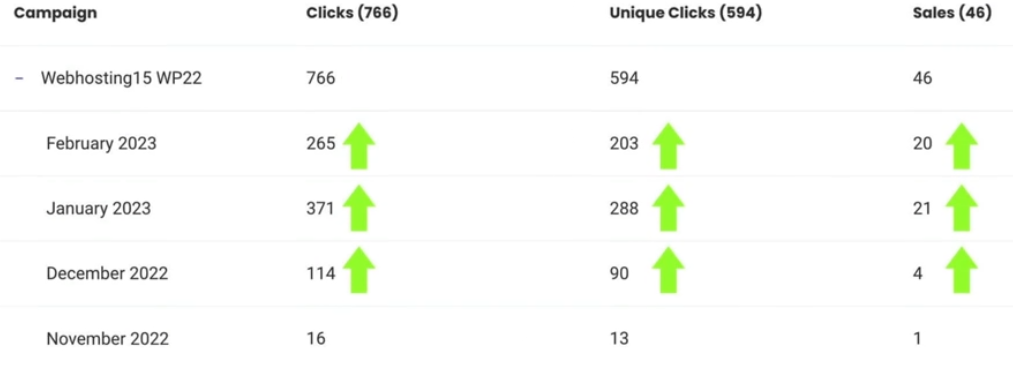
Maybe you think: How can this give you 320% more revenue when the increase is only 37%? Great question! When the click-through rate of a video becomes higher, YouTube wants to share the video with more people. So, because of the 37% increase in CTR (Click Through Rate), I did not just get 37% more visitors, but I got 400% more visitors to my YouTube video. And in that way, I was able to increase my revenue with 320%.
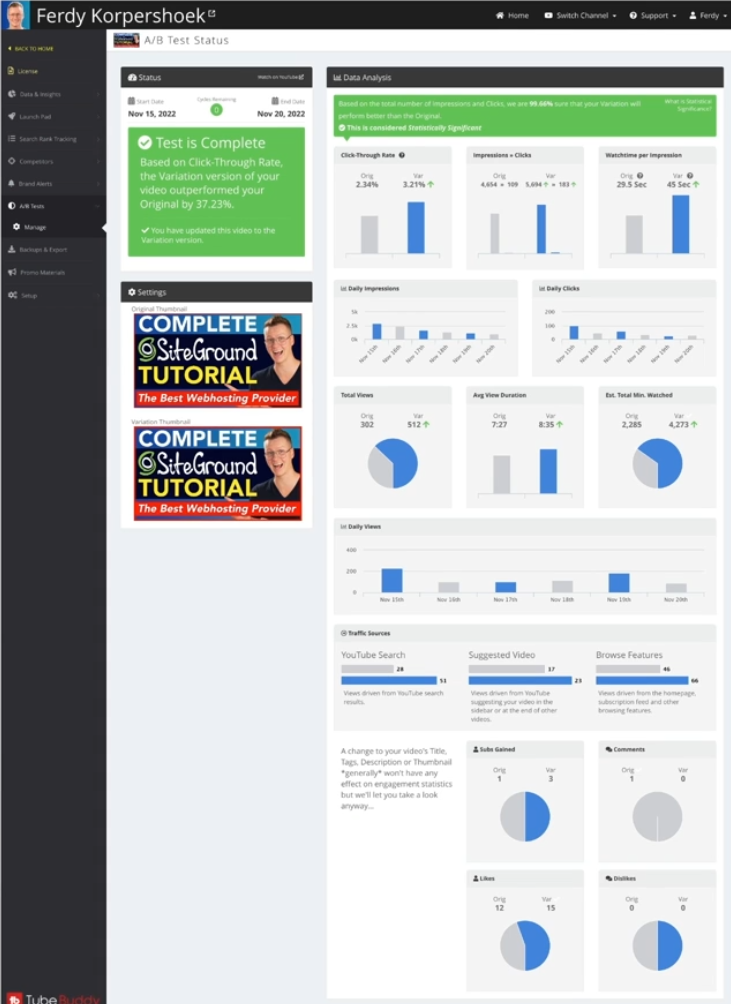
All the data TubeBuddy gives you when performing an A/B Test
What is A/B Testing on TubeBuddy?
A/B Split testing is the process of selecting two different thumbnails and letting
TubeBuddy shows each thumbnail every other day. When you do that, TubeBuddy keeps
Track all the statistics and show you which thumbnail is performing better. These are
The statistics TubeBuddy is tracking:
- Click-Through Rate
- Impressions > Clicks
- Watch time er Impression
- Daily Impressions
- Daily Clicks
- Total Views
- Avg View Duration
- Estimated Total Minutes Watched
- Daily Views
- YouTube Search Numbers
- Suggested Video Numbers
- Browse Features Numbers
- Subs Gained
- Comments
- Likes
- Dislikes
With all those statistics, TubeBuddy can automatically help us decide which thumbnail is
performing better. In the end of the day, it will bring you a higher click-through rate, more
views, and more exposure on YouTube because videos with a higher click-through rate are
shown more often on YouTube.
Which statistics are the most important ones?
I know it looks overwhelming and exciting – all those statistics. I focus on two statistics.
1. Click-Through Rate
2. Average View Duration
When those two are better than the original thumbnail, I have a winning thumbnail. Why?
For YouTube, Click-Through Rate and Average View Time are super important!
Which one is the most important? Average View Duration. YouTube wants to keep the
viewer on the platform as long as possible so they can make more money through ads. So
if you can let viewers stay on the platform for a longer time, YouTube loves that!
How can a thumbnail increase or decrease the Average View Duration?
If I made a thumbnail that states that people can start making $1,000 per day by doing
something for 5 minutes, my Click Through Rate would go through the roof. A high percentage
would click! But when the viewers would find out it is a video about plants, they would leave the
video as soon as they click on the video.
When your thumbnail is not in line with your content, people tend to leave unless the content is
better than what the thumbnail suggests. So getting a higher click-through rate is not hard.
But it can decrease the Average View Duration. When your thumbnail and the content of your video
If you are in line, you can increase your Average View Duration.
The best scenario is when your new thumbnail is performing better than the original, and it is
increasing the Average View Duration. Then your video can start to perform a lot better, as you
have seen in the case study above!
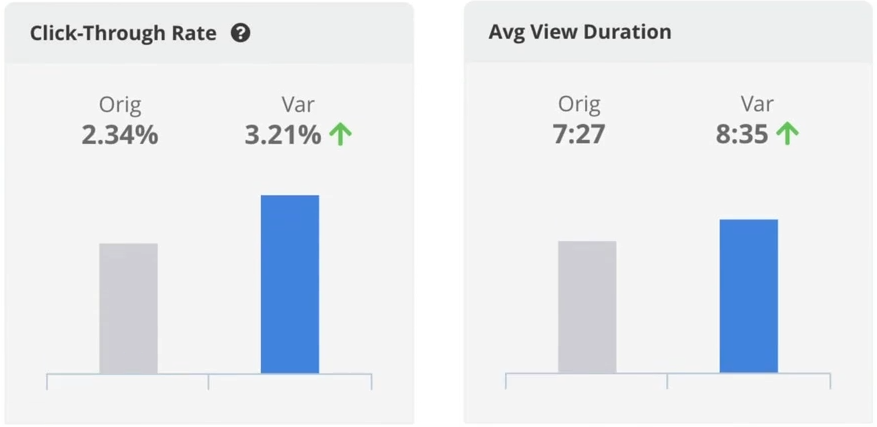
This is the best scenario: That your new Thumbnail increases the CTR and the Average View Duration
What to do after an A/B Split Test
After finishing your A/B Split test, you can do a new split test on the winning thumbnail. In
That way, you can keep making your thumbnail better to drive more traffic and let
YouTube shows your video to more people.
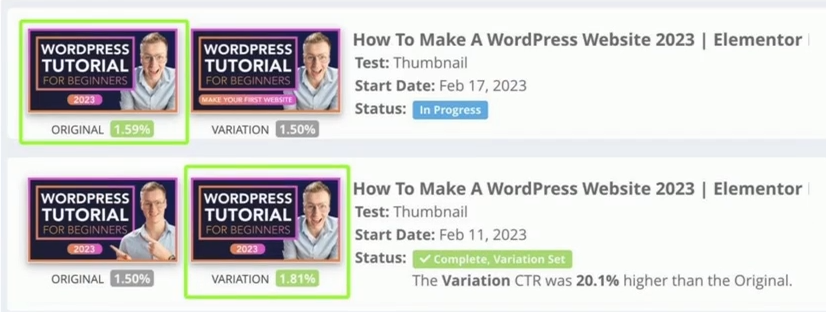
Let me talk about the example you see above. I tried a different profile picture of myself.
The left one (below) is a tele shot (zoomed in from a distance). The right one (below) is a
close-up image (24mm lens). The thumbnail with the close-up image performs 20% better
than the left image.
So I chose this winning thumbnail. But now I tried something else with the winning
product. I changed the text in the button from “2023” (left above) to “Make Your First
Website” (right above). TubeBuddy found out that the original with “2023” is performing
better. When the Average View Durations of both thumbnails are almost the same, I
would go with the original image and try something new.
Your goal should always be to have a few A/B Tests in progress. Why? In that way, you can
keep optimizing your thumbnails, get more views, and be shown to a broader audience on
YouTube, make more money and grow your channel.
Split Testing Your Title, Description, and Tags.
You can even take it a step further. You can not just do an A/B test on thumbnails but also on your Youtube video’s Title, Description, and Tags. So you can play around with that and see what is performing better. When you use the same tags as the number one video on your video’s perfect search term, it can be that your video will be suggested more. Let’s show an example
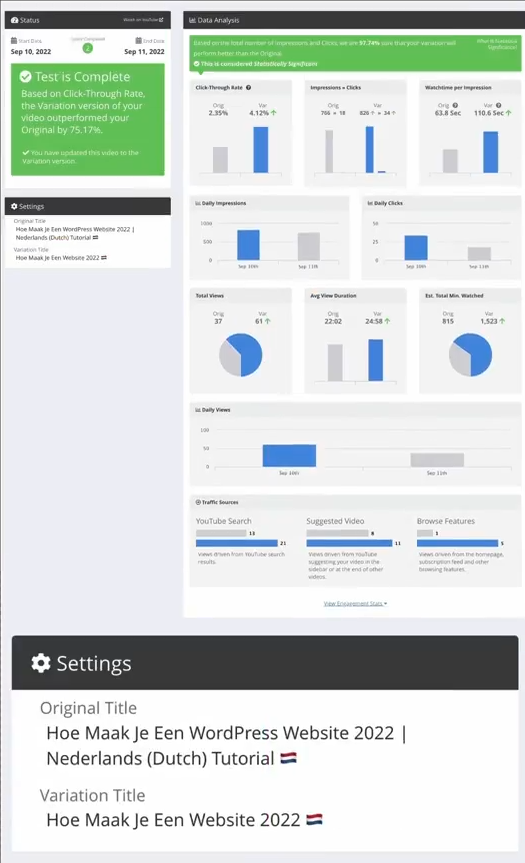
Changing the title (English translation: “How To Make A WordPress Website 2022|
Dutch Tutorial” to “How To Make A Website 2022” Increased The Click Through Rate
With 75% Views. So again, not only 75% more views but also more exposure from
YouTube, because a lot of people click on my thumbnail. YouTube promotes videos
with a high CTR. The Average Watch Time was a bit better, so that is
also good! If the watch time was 50% less, I would not go with the Variation Title.
How to get started with Tubebuddy A/B Testing
So, I hope you are excited to see the results yourself! So, how to get started? You can sign up for TubeBuddy via the button below
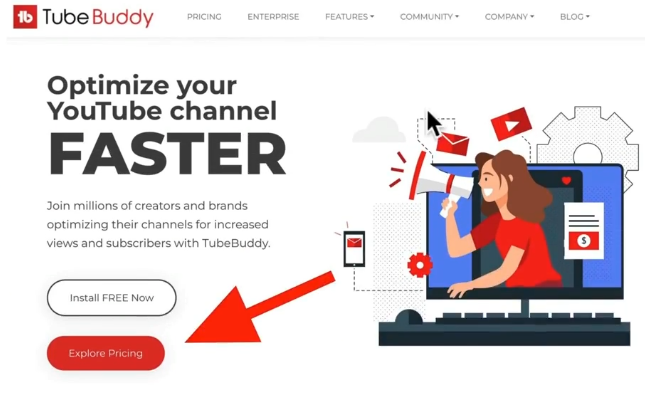
Go to TubeBuddy and click on Explore Pricing
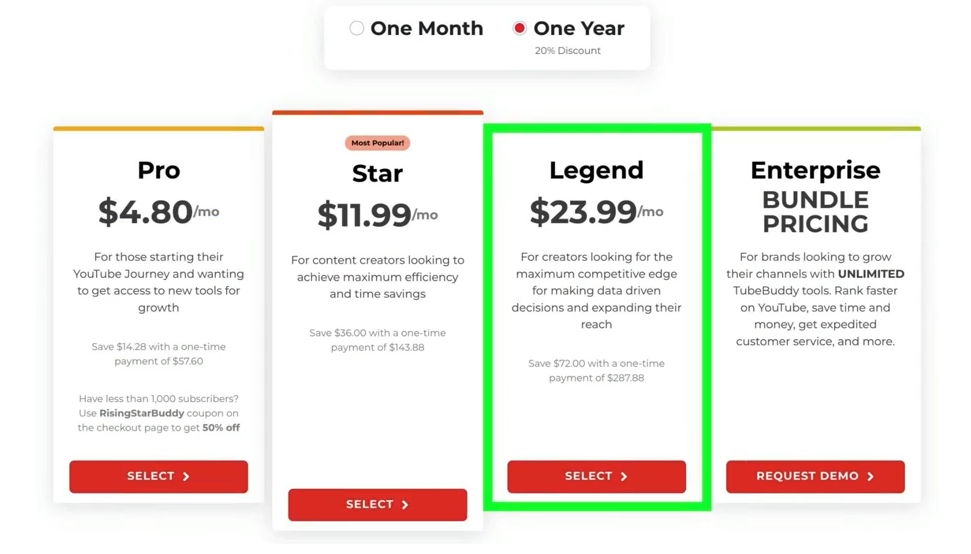
Now you need to choose the Legend plan because that plan enables A/B Testing. Let’s do some
math: When you make $30 per 1000 views on Youtube, and you have ten videos that generate
100 views per day, you will make around $30 per day. When you apply A/B testing and you
increase the Click Through rate on all videos with 20%, you make $36 per day. $6 extra times 365
days = $2,190 extra money per year. And then I am not even talking about getting more views
because your Click Through Rate is higher. That is why I am so excited about TubeBuddy and A/B
Testing.
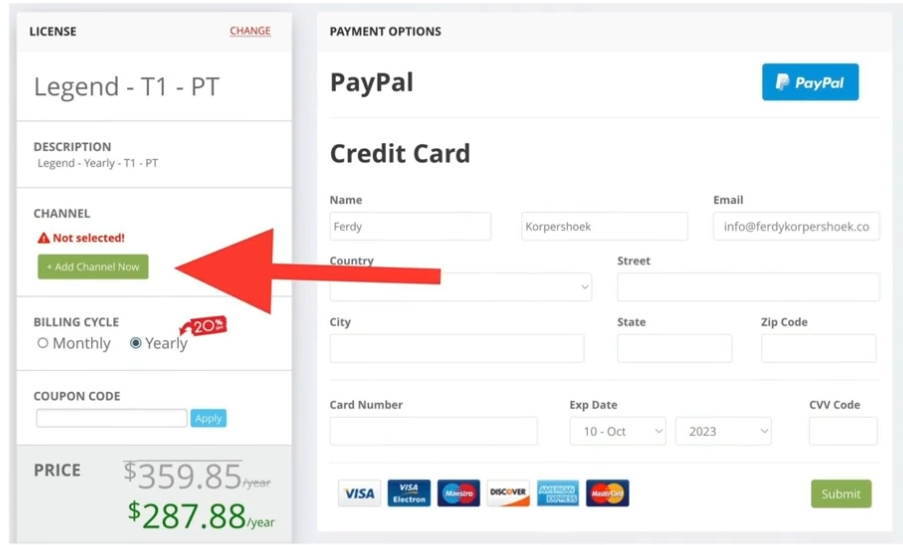
Linking your YouTube Account (Which is Totally Safe)
After you select the Legend Plan, you need to link your YouTube Account and fill in your credentials. You can pay with PayPal and a Credit card
Create your own A/B Split test
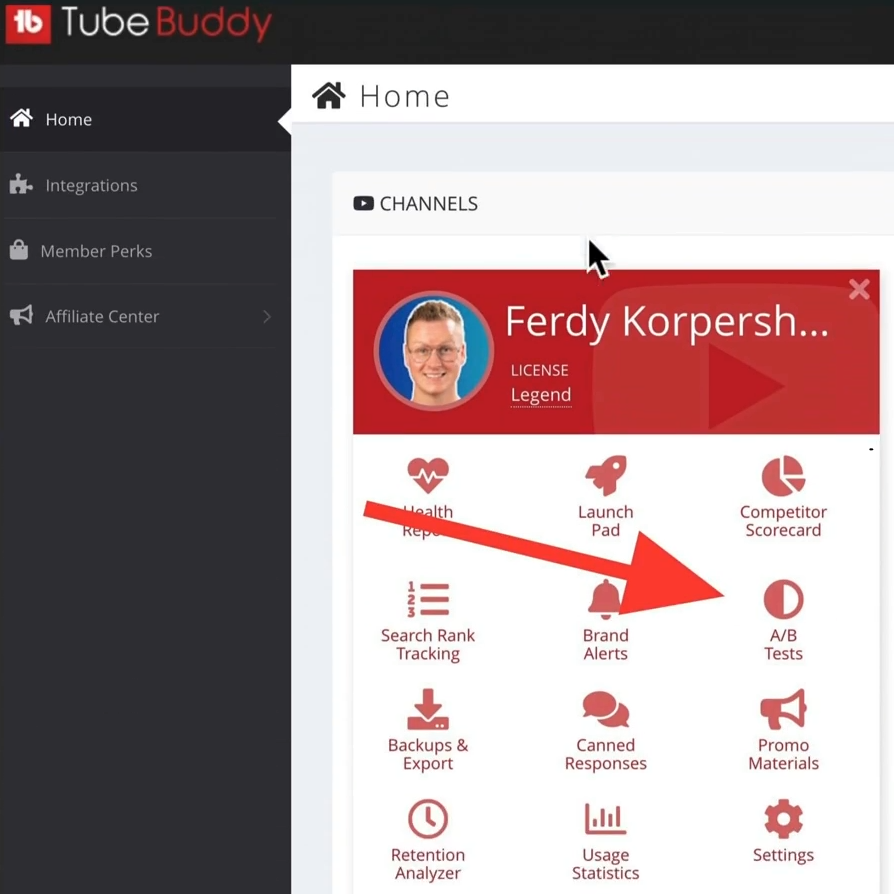
Now you can start doing your split tests. Go to your Tubebuddy dashboard and click on A/B tests
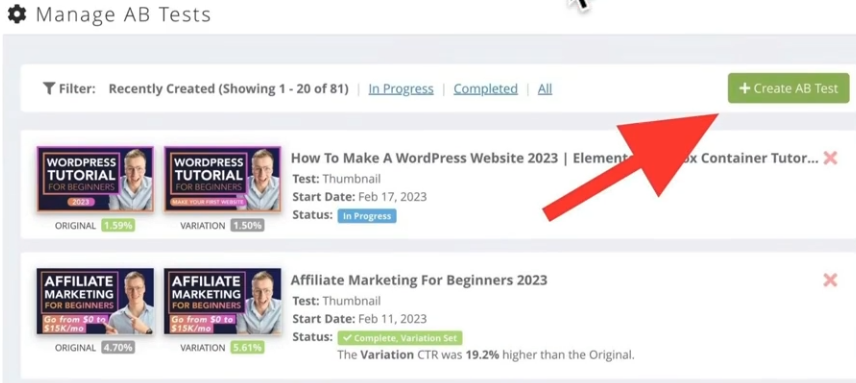
Click on the Green button that says: “Create AB Test”.
Upload the second thumbnail that you created for the Split Test. Do you yet have to create a thumbnail? You can follow this guide on how to do that using TubeBuddy.
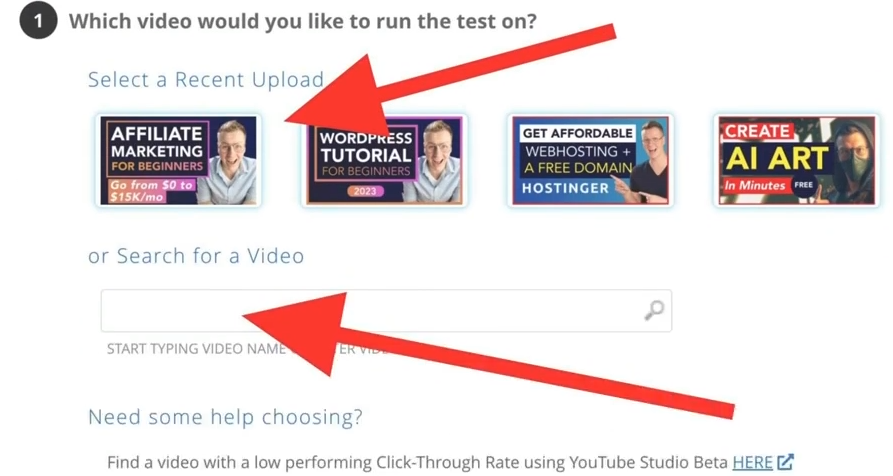
You can select one of your recent videos or search for a specific video by typing in the title or a keyword vour video contains
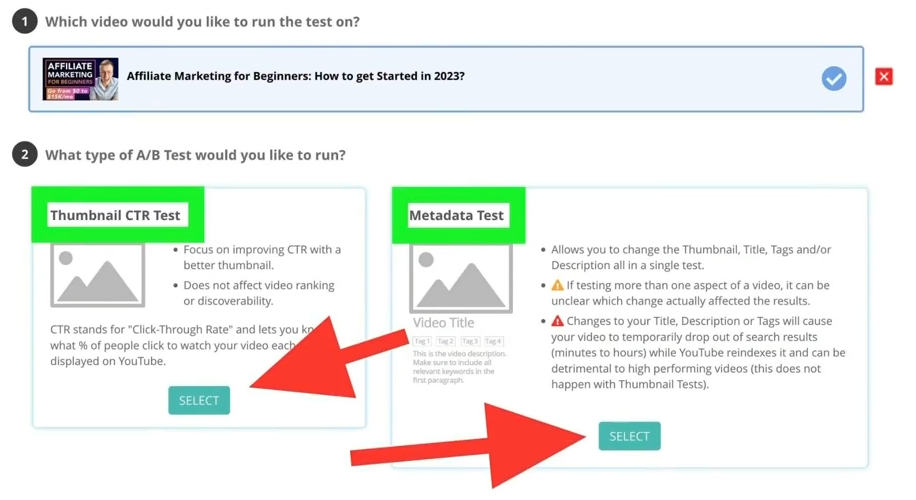
There are two types of A/B Tests.
1. Thumbnails
2. Metadata (Title, Description, Tags, Thumbnail)
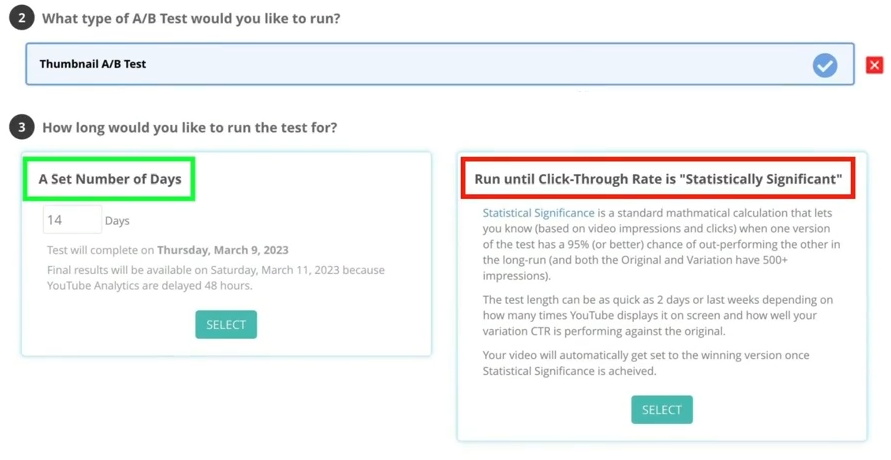
After selecting the 14 Days option, upload the second thumbnail to TubeBuddy. Now TubeBuddy
will work its magic! So you can sit back and relax. Every 24 hours TubeBuddy will change your
thumbnail and keep track of the statistics.
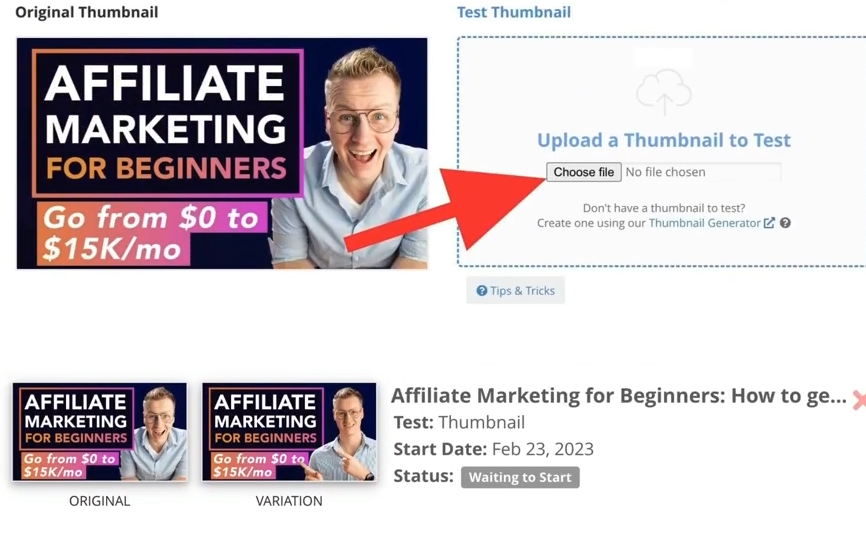
Is there a maximum amount of thumbnails you can test?
There is no maximum amount of A/B tests you can run at the same time, so I would definitely get
the most out of it by creating tons of thumbnails and finding out which ones are performing
better!
You can also do this with older videos! When you make this a weekly habit, you can be 100% sure
that your videos will perform better!
What else can you do with TubeBuddy?
This was only one feature of TubeBuddy. But wait! There is more! Here are some other features
TubeBuddy offers:
. Health Report
· Launch Pad
. Competitor Scorecard
· Search Rank Tracking
. Brand Alerts
· Backups & Export
· Canned Responses
· Retention Analyzer
· Usage Statistics
· Promo Materials
. Replay Templates

Your content goes here. Edit or remove this text inline or in the module Content settings. You can also style every aspect of this content in the module Design. (BlogPost made by Ferdy Korpershoek, but not entirely WebDevine Property)
Quick Links
info@divi5.com
1962 w 22nd St
Los Angeles CA 90018-1560
USA
Monday-Friday
09:00AM – 5:00PM
© 2024 | Privacy Policy | Terms Of Use | Disclaimer | Website Made By Ferdy Korpershoek